Say Goodbye to n8n and Coze? Build a Fully Automated Content Pipeline with Claude Skill (Tutorial Included)
https://mp.weixin.qq.com/s/aTJ0r45Sd71dz_raTQPOOw
Did you see the article above? Writing it took just one sentence:
"Help me search for information about Anthropic's Skill, write a WeChat Official Account article with 'What is Skill' as the theme."
Then my Skill workflow began: automatically searching for relevant materials, automatically writing the article based on the search results, automatically calling Nanobanana for images, then automatically uploading to the WeChat Official Account backend, and automatically formatting it into what you see now.
In the end, I just clicked save and publish, scanned the QR code, and it was published successfully.
This is the powerful capability of Skill. Seeing this, I believe some people will say, isn't this just Coze and n8n? We could do this before.
But unlike Coze and n8n, I created this Skill with just one sentence:
"I want to design a skill that automatically searches for AI content on X, automatically generates articles, adds images, and then uploads to the WeChat Official Account."
And then, this Skill was automatically generated for me.
This is the power of Skill: both powerful and simple.
I have to say, this time, Anthropic has killed the competition again.
Today I want to share how to write your own Skill.
After reading this article, you will learn:
- What is Skill?
- What can Skill do?
- The difference between Skill and MCP
- Step-by-step guide to making an auto-publishing WeChat Official Account Skill
- How to find reliable ready-made Skills
1. What is Skill?
Simply put, a Skill is an operation manual for AI.
We can imagine Claude as a super capable all-round intern:
- Before Skill:
You ask him to work (e.g., "Write a WeChat Official Account article"), you have to teach him hand-in-hand every time: "The title needs to be shocking, the layout needs to be segmented, add a QR code at the end..." If you don't teach him, he will only write dry text for you. Repeating the teaching every time is a waste of breath (waste of Tokens), and AI tends to forget. - Now with Skill:
You write these requirements into a "Viral Article Writing Guide" (this is a Skill) and stuff it into his backpack.
Normally, he carries the bag without using his brain. But as soon as you shout "Help me write an article", he can automatically identify the need, pull out this guide from his backpack, and follow it strictly.
Its greatest strength lies in being smart and worry-free:
- Trigger on Demand: AI knows what skills are in its bag, so you don't need to remind it every time.
- Save Brainpower: When not working, it doesn't occupy AI's context memory (Context), only opening it when used.
- Reusable: Once this guide is written, it can be used every day and shared with others.
Take my auto-publishing Skill above as an example, the whole process is like this:

In the past, we first had to let AI search for relevant materials, then let it write into an article, then use another image generation AI to generate images to insert into the article, and finally go to the WeChat Official Account for formatting. But now with Skill, you can directly string these capabilities together and let it automatically implement the entire process.
I know many people want this workflow. We will introduce others first, and I will share this auto-writing and publishing workflow at the end of the article.
2. What can Skill do?
Let's continue with the intern metaphor. Skill can mainly help this intern unlock three core capabilities:
1. Let AI Replicate Your Work Habits (SOP)
This is the most basic usage. You can package your work standards, formatting requirements, and pitfalls guide for AI.
- Before: You ask AI to write a weekly report, it writes a mess, and you have to correct it for half a day.
- With Skill: You give him a "Weekly Report Special Skill".
- He opens it and reads: "The first paragraph must state the conclusion first", "Data must be listed in a table", "Tone must be serious".
- Result: The weekly report he writes is just like what you wrote yourself, perfect format, and even learned your catchphrases.
- (Official example:
internal-commsis designed for this, making the whole company's weekly reports taste the same)
2. Install Professional Software for AI (Tools)
Just knowing how to write is not enough; Skill can also install professional software and code tools for AI.
- Before: You ask AI to help you make a GIF, he can only shrug and say "I can't do it, I only type".
- With Skill: You give him a "GIF Making Skill" (which contains a piece of Python code).
- He can directly run the code in the background and really draw a moving GIF for you.
- Similarly, you can give him a "Word Expert Skill", and he can directly modify the format and track changes in Word documents, instead of just spitting out a pile of text for you.
- (Official examples:
slack-gif-creatoranddocxskills)
3. Instantly Copy Master's Experience (Knowledge)
Skill is a file, which means it can be copied and pasted.
- Scenario: You just recruited a new media novice (or you are a novice yourself) and don't know how to write a viral title with 100k+ views.
- With Skill: You find the "Viral Title Skill" written by Mimeng or Ogilvy and throw it to AI.
- Result: Your AI instantly possesses master-level titling ability. You don't need to understand, you just need to own this Skill.
3. What is the difference between Skill and MCP?
This is where everyone gets confused most easily. Let's break it down with the simplest metaphor:
Skill = Recipe 📖 (Teach AI HOW: chop vegetables, add salt, plate)
MCP (Connection) = Refrigerator 🧊 (Provide AI with Ingredients: data, documents, web pages)Skill teaches methods, MCP provides data. Combined, they are a super chef.
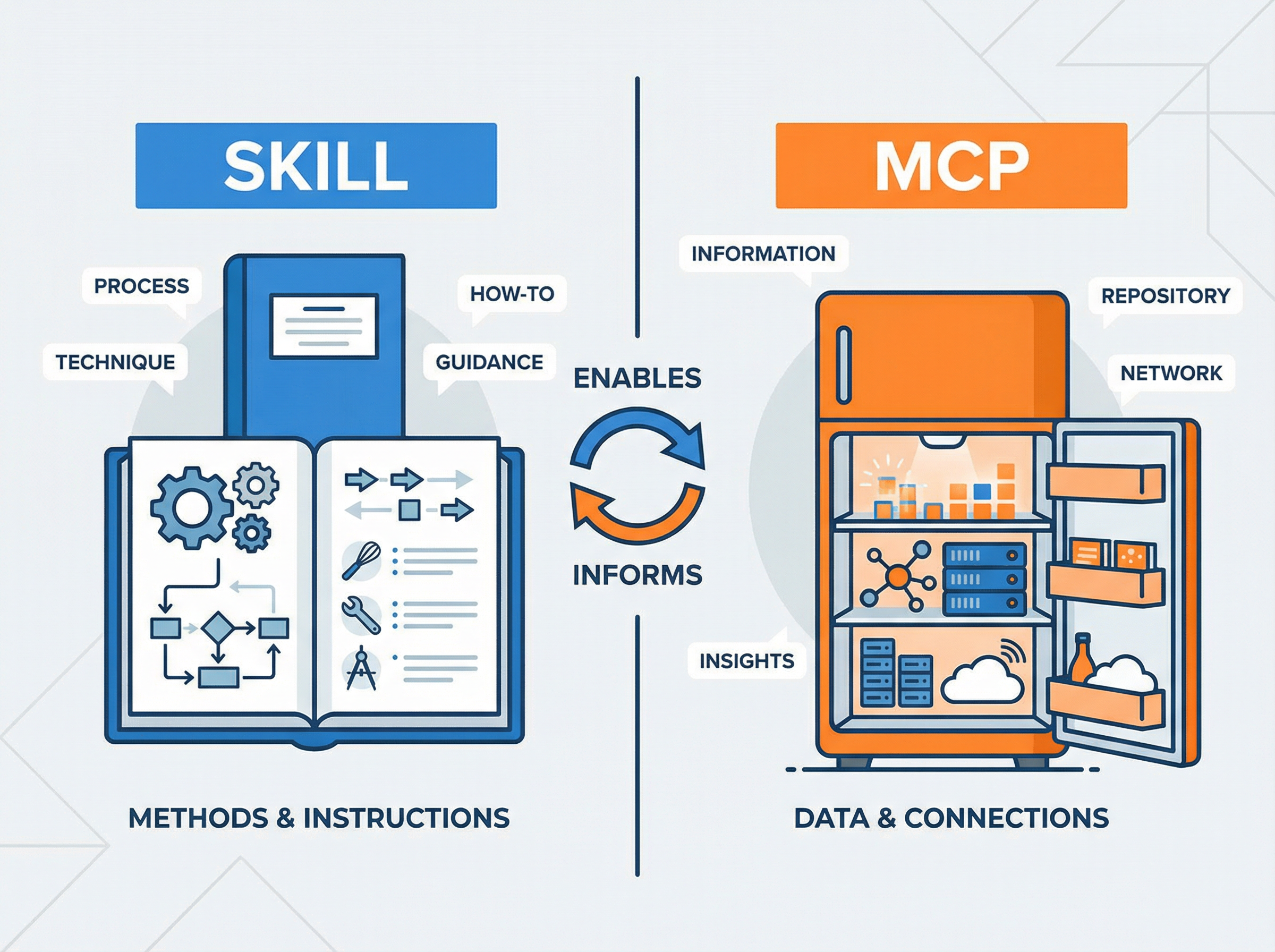
Although we have this one-sentence summary, to make you thoroughly understand, let's break it down in detail from three dimensions.
1. Different Core Positioning: Internal Cultivation vs External Plug-in
-
Skill (Internal Cultivation):
- Focus: How. It is a set of pure text instruction sets (sometimes with scripts).
- Function: It teaches AI logic of thinking, steps of doing things, and norms to follow.
- Essence: It is training the model's own brain to make it understand you better.
- Example: Teach AI how to write a P7 promotion PPT that fits Alibaba's style.
-
MCP (Powerful Plug-in):
- Focus: What. It is a connector (Server).
- Function: It helps AI connect to the external world's data and tools.
- Essence: It gives AI clairvoyance and clairaudience, allowing it to see data it couldn't see originally.
- Example: Let AI connect to your company's MySQL database to check yesterday's DAU.
2. Different Usage Scenarios: Solo Operation vs Network Collaboration
We can look at how they cooperate through a "Write Stock Market Analysis Report" scenario:
| Step | Who is responsible? | Why? |
|---|---|---|
| Step 1 | MCP | I need to get today's latest stock price, K-line chart, and news. (AI has no market data in its brain today, must rely on MCP to connect to the network to grab it) |
| Step 2 | Skill | I need to analyze this data and write a comment according to "Buffett's Value Investment Logic". (AI got the data but doesn't know how to analyze it, Skill tells it the analysis framework) |
| Step 3 | Skill | I need to format, generating a fiery PDF report. (Skill guides AI on how to generate PDF) |
| Step 4 | MCP | I need to send, sending the report to the boss via email. (AI cannot send emails by itself, needs MCP to connect to the email server) |
Summary: MCP is responsible for bringing back ingredients (data), and Skill is responsible for processing ingredients into a Michelin feast (result).
3. Different Technical Forms: Lightweight vs Heavyweight
-
Skill is very light:
- It is usually just a few Markdown files (
SKILL.md). - Advantage: Very easy to share. You pack the folder and send it to a colleague, and the colleague can use it by throwing it into Claude.
- Disadvantage: It cannot update data in real-time, nor can it perform large-scale complex calculations (unless writing scripts).
- It is usually just a few Markdown files (
-
MCP is heavy:
- It is a running service (Server), usually requiring environment configuration, API Key, and network connection.
- Advantage: Extremely powerful capabilities, can connect everything (database, Slack, GitHub, local files).
- Disadvantage: High configuration threshold, troublesome to share with others (others also have to configure an environment).
⚠️ Conclusion: Do not oppose them, they are golden partners.
The future AI workflow must be: Use MCP to connect your data assets, and use Skill to solidify your business processes.
4. Step-by-step Guide: How to Build Your First Skill
Since Skill is so useful, how to make it?
Step 1: Preparation (Install Claude Code)
Although Skill can also be uploaded and used on the Claude.ai web version, for development convenience, it is recommended to use the command line tool Claude Code.
Open the terminal, enter the following commands to install and log in:
npm install -g @anthropic-ai/claude-code
claude login
After installing Claude Code, even if you don't have a Claude account, you can use DeepSeek / Qwen / GLM and other domestic models to drive Claude Code.
Taking DeepSeek V3 as an example, it officially supports the Claude protocol. You only need to execute the following three lines of commands in the terminal to configure environment variables (remember to replace your Key):
export ANTHROPIC_BASE_URL="https://api.deepseek.com/anthropic"
export ANTHROPIC_AUTH_TOKEN="sk-Your-DeepSeek-API-Key"
export ANTHROPIC_MODEL="deepseek-chat"
After configuration is complete, run the
claudecommand directly, and you will have a programming assistant driven by a "Domestic Super Brain", which also supports Skill capabilities!
Of course, my steps above may still be very rough. In fact, for such problems, just throw them directly to your AI assistant, let him guide you step by step, ask him if you encounter problems, feedback little by little, and improve little by little.
Step 2: Understand the Anatomy of Skill
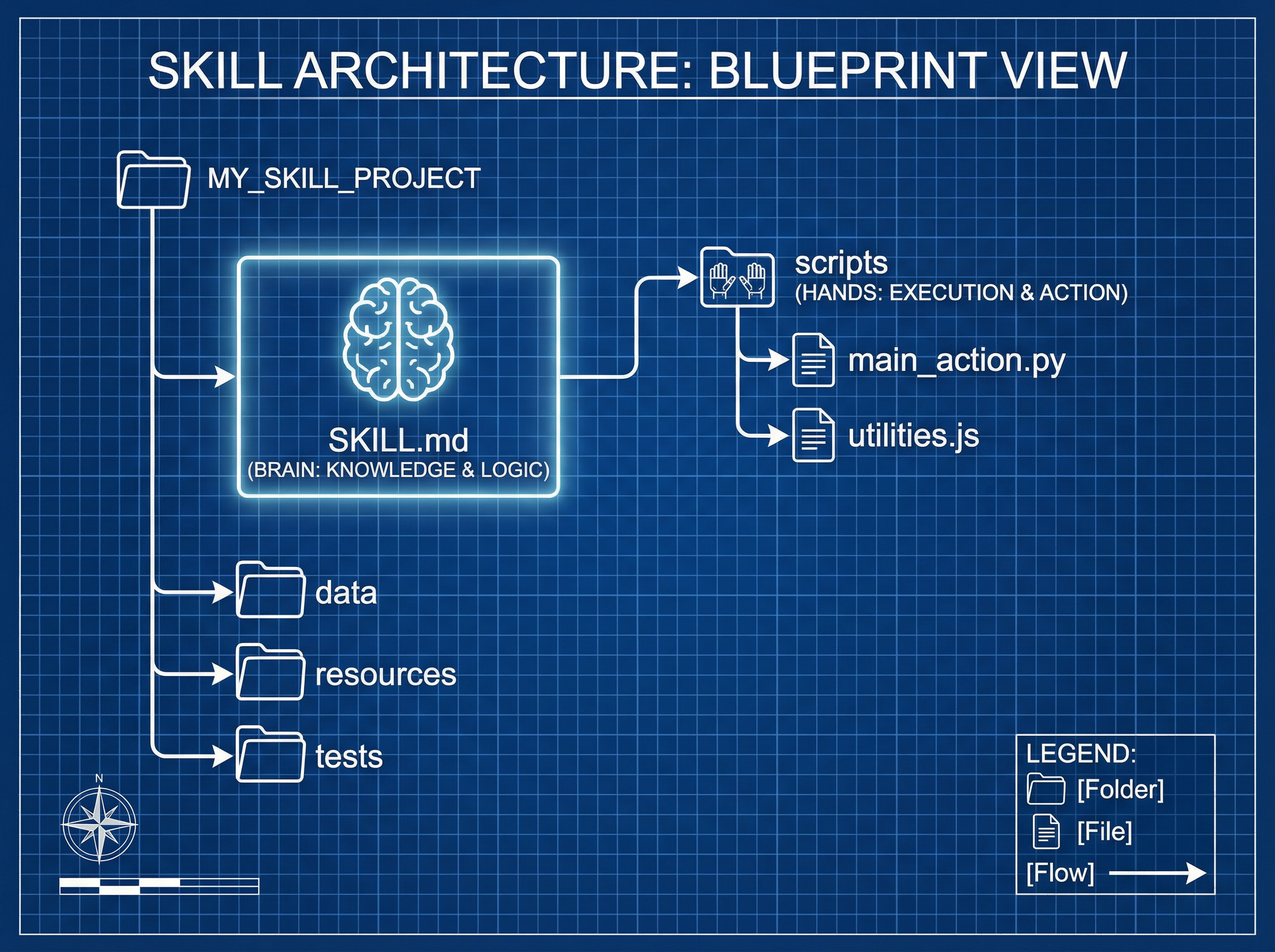
A standard Skill is actually a folder, which must contain a core file SKILL.md.
The standard structure recommended by the official is as follows:
my-code-reviewer/           <-- Skill folder
├── SKILL.md                <-- [Core] Brain (write instructions and metadata)
└── scripts/                <-- [Optional] Hands and feet (put Python/Bash scripts)
    └── check_style.py      <-- For example: a script specifically used to check code style
Official Mindset:
- SKILL.md: Responsible for "High Degrees of Freedom" guidance (e.g.: code logic must be clear).
- Scripts: Responsible for "Low Degrees of Freedom" execution (e.g.: must conform to PEP8 specifications; leave such rigid work to scripts to run, saving Tokens and being precise).
Step 3: Write SKILL.md
Create a new SKILL.md in the my-code-reviewer folder, with content in two parts:
1. ID Card (Frontmatter)
This is the "self-introduction" for Claude, telling it when to use this skill.
---
name: code-reviewer
description: Use this skill when the user needs to review Python code quality, find bugs, or optimize performance.
---
2. Manual (Markdown Body)
These are the specific execution instructions.
# Code Reviewer Guide

You are a senior Python architect. Please review the code according to the following steps:

1.  **Security Check**: Prioritize checking for SQL injection, XSS, and other security risks.
2.  **Performance Optimization**: Point out loops with excessive time complexity or unnecessary memory usage.
3.  **Style Specification**: Ensure variable naming conforms to snake_case.

## Output Format Requirements
Please list all problems in a table format and sort by "Severity (P0-P3)".
Step 4: Advanced Tips
There are a few hidden "unspoken rules" that can make your Skill more useful:
-
The context window is a public good
- Principle: Default that Claude is already very smart. Don't write nonsense.
- Practice: Don't write "Python is a programming language...", write directly "Check the usage of List Comprehension".
-
Set appropriate "Degrees of Freedom"
- High Degrees of Freedom: Use text instructions. Suitable for creative tasks (such as "write a beautiful comment").
- Low Degrees of Freedom: Use scripts. Suitable for rigid tasks (such as "convert JSON to CSV"). Don't try to use Prompts to let AI do complex mathematical calculations or format conversions, directly write a Python script and throw it in the
scripts/directory for it to call, steady, accurate, and ruthless.
-
Progressive Disclosure
- If your skill requires a large amount of reference documentation (such as hundreds of pages of company API documentation), don't stuff it all into
SKILL.md. - Practice: Create a
references/folder and put the documents in it. Write inSKILL.md: "If you encounter payment-related problems, please readreferences/payment_api.md". This way it doesn't occupy memory usually, and is retrieved only when used.
- If your skill requires a large amount of reference documentation (such as hundreds of pages of company API documentation), don't stuff it all into
Step 5: Installation and Use
In Claude Code, you can load your skill through plugin commands:
# If it is the official skill library
/plugin marketplace add anthropics/skills

# If it is a local skill (according to your configuration path)
# Usually Claude Code will automatically identify .claude/skills in the project directory or the specified path
Once installed, you just need to say to Claude: "Help me Review this code", and it will automatically match the code-reviewer skill through description, transforming into your exclusive architect.
After reading the method of making this Skill above, you still haven't learned how to build a Skill, right?
It doesn't matter, there is a simpler one-sentence creation of Skill.
Back to step one, when we finish installing Claude Code and access the model, say directly to AI:
"Read the content in https://github.com/anthropics/skills, and then help me install the skill creator inside."
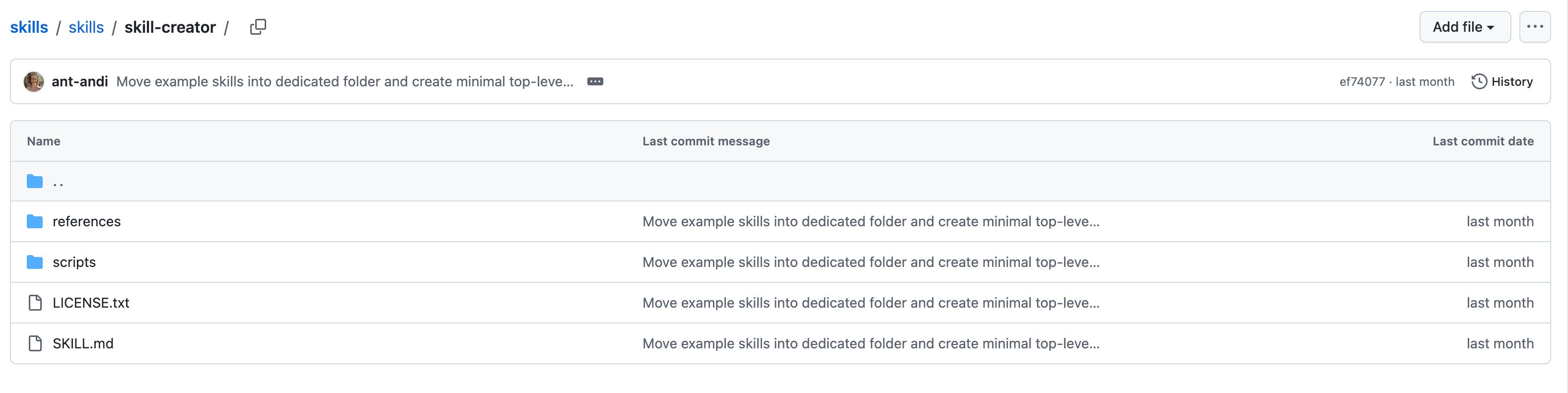
With this Skill named "Skill Creator", we can create our own Skill with one click.
Then creating a Skill requires only one sentence, for example, designing a Skill for automatically publishing to WeChat Official Account, just use the following sentence:
"I want to design a skill that automatically searches for AI content on X, automatically generates articles, formats them, and automatically uploads to the WeChat Official Account."
Then, whoosh, a complete Skill is generated. Of course, it should be noted here that since this is a relatively complex Skill, we need to provide AI with the ability to search for X-related content when creating it. I use MCP-Exa.
In addition, automatic publishing to WeChat Official Account also requires providing the Official Account's API, which can generally be found in our Official Account backend here.
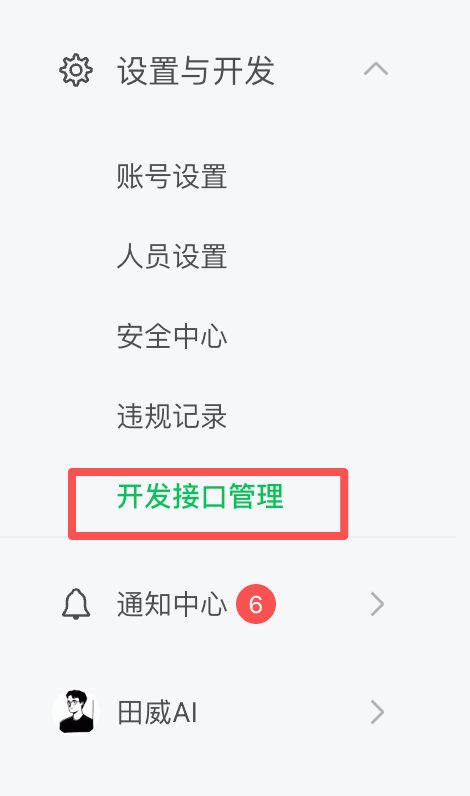
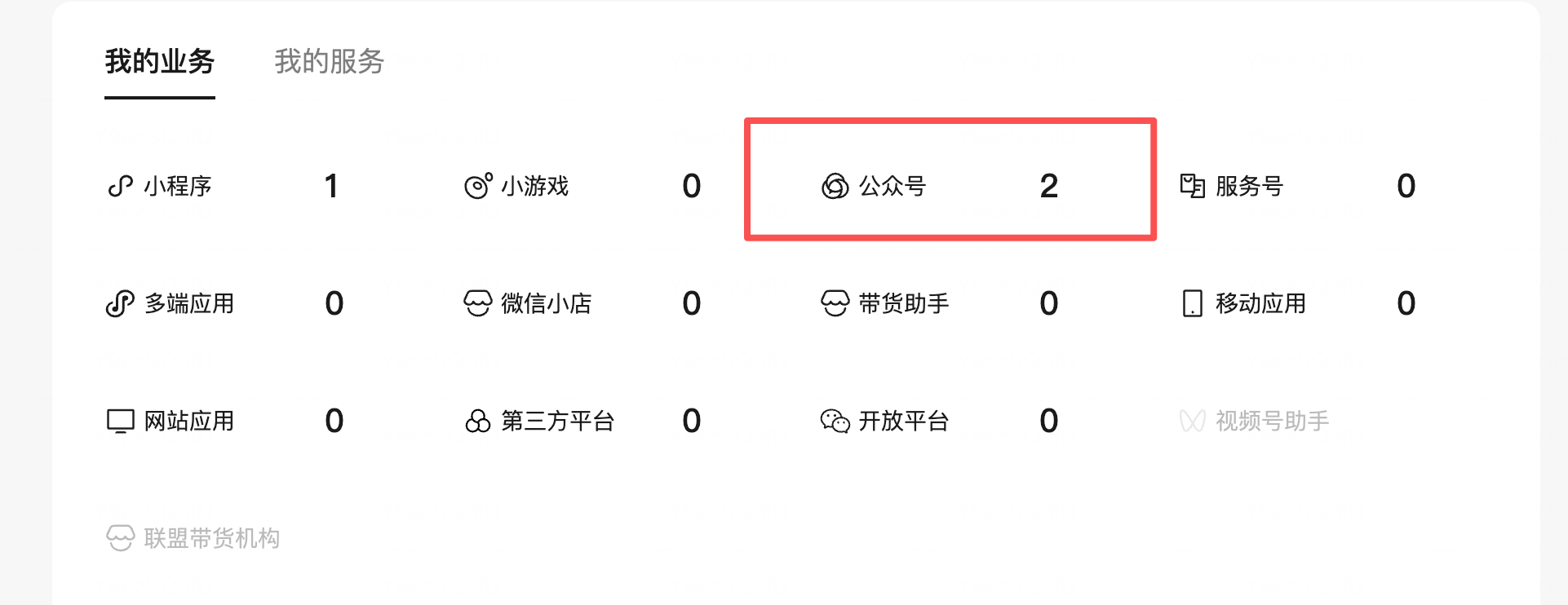

Collect these materials, throw them to AI, and you can successfully implement the creation of the WeChat Official Account article automatic publishing Skill.
If you also want to implement automatic image generation, you only need to access the Nanobanana API, and then let AI generate images based on the article content and insert them into the article to achieve it. The final effect is as shown in my article below.
"Automatically search materials, automatically write articles, automatically add images, automatically format, automatically publish."
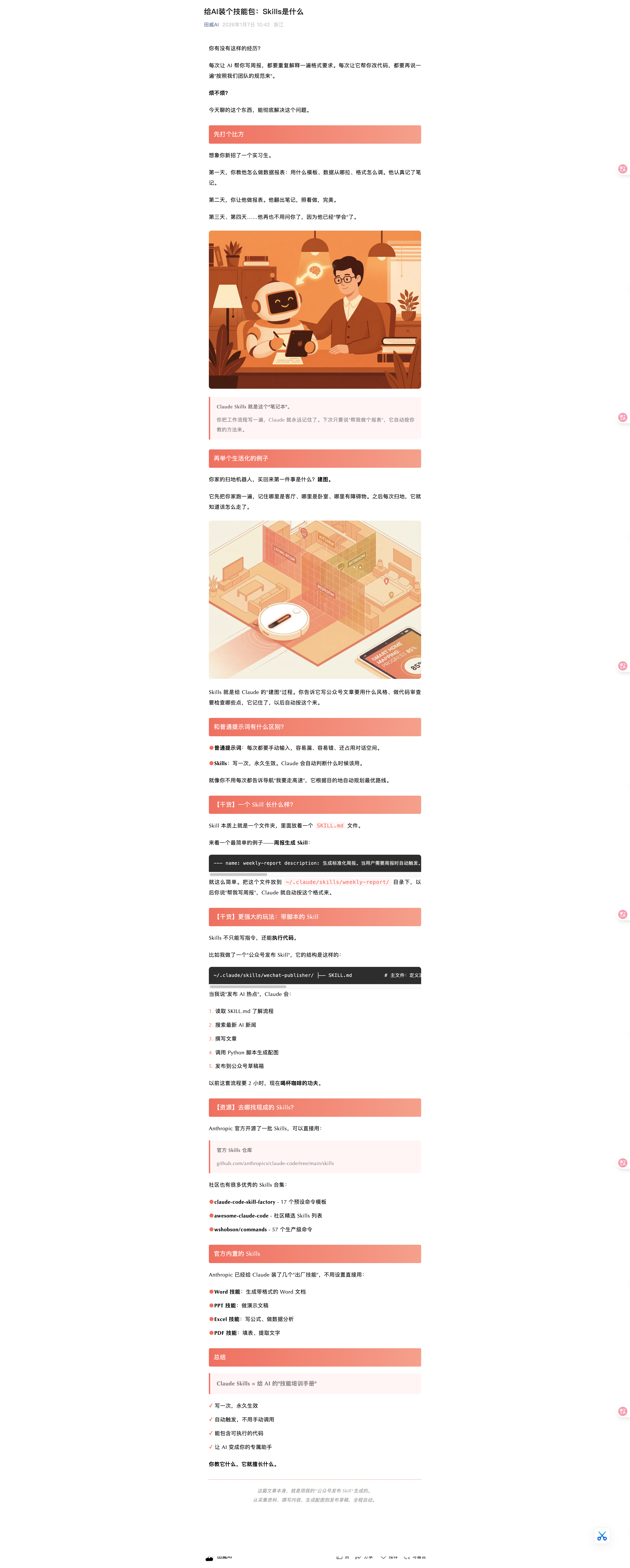
Of course, there will definitely be some errors in the middle, requiring a few rounds of debugging. Good things take time.
Drawing inferences from one instance, using Skill, we can do many things, such as automatically grabbing Little Red Book content, automatically imitating writing, and then automatically publishing.
For example, getting daily investment research content mentioned earlier, writing research reports based on K-line charts, etc., or getting weekly chat records, and automatically generating weekly reports based on chat records, etc.
5. Skill Sharing Platforms
Finally, share a few channels to get ready-made Skills to help you quickly arm yourself:
- Official Repository (Most Orthodox):
anthropics/skills- Anthropic officially maintained skill library, with the highest quality, covering core scenarios such as document processing and code development.
- Community Selection (Awesome List):
travisvn/awesome-claude-skills- The most complete third-party skill collection list on GitHub, where you can find geek functions like "iOS Simulator Operation" and "Playwright Automation Testing".
- Skills Marketplace:
skillsmp.com- An unofficial skill market, although the quality varies, it wins in quantity and is suitable for panning for gold.
With these Skills, your Claude is no longer just a chatbot, but an all-round digital employee who can help you write code, make reports, and fix bugs.
⚠️ High Risk Warning: Beware of Skill Poisoning
The essence of Skill is code and instructions, which means it has permission to operate your computer.
People with ulterior motives may secretly implant malicious scripts in third-party Skills (such as silently uploading your
.envfile, stealing browser Cookies, etc.).So before running any non-official Skill, be sure to personally read every line of code in its
SKILL.mdandscripts/directories! If you don't understand, throw it to Claude and let it check for backdoors for you. Never blindlyinstall, data is priceless!
Now, go and make your first Skill!
I am Tian Wei. If you have any questions after reading the article, feel free to ask~